Organic Instagram growth
Cell Phone Addiction and Instagram: Signs and Ways to Cope
Signs of cell phone addiction for Instagram creators and ways to cope: screen time limits, an intent log and replacement habits that keep work on track.
By Flock Social TeamPublished August 29, 20266 min read
A notification buzzes during dinner. You check it, then stay for six more minutes because the next post in the grid is a Reel, and the one after that is a carousel from an account you half-follow. Cell phone addiction looks exactly like this for most creators and marketers: not a dramatic collapse, but a dozen small handoffs of attention per hour that add up to hours per day. Below are the signs worth watching for and the coping strategies that actually work when quitting Instagram isn't an option because it's also your income.
The approach here isn't "delete the app." It's building a system that lets you use Instagram professionally without letting it use you. Part of that system includes managing how you fill the small gaps in your day, the ones that usually get filled with a reflexive scroll. If you want a lower-friction way to occupy those minutes, it helps to look at structured ways to gain general knowledge instead of defaulting to the feed every time you have thirty seconds free.
What cell phone addiction actually looks like for creators
Clinically, "addiction" to a phone or app isn't a formal diagnosis the way substance use disorders are, but researchers who study compulsive smartphone use have linked heavy, unstructured use to higher self-reported anxiety and depression scores. For creators, the pattern has a specific shape: you open Instagram to post or respond to a DM, and twenty minutes later you're three accounts deep in a niche you don't even work in.
The mechanism is simple. Instagram's feed and Reels algorithm is a variable-ratio reward system, the same structure that makes slot machines effective. You don't know which scroll will surface something genuinely useful (a trend, a comp's numbers, a brand lead) so you keep pulling. For someone whose job requires being on the platform anyway, this blurs the line between work and compulsion fast.
A low-effort replacement that still respects a short attention span works better than an ambitious one. Short, structured lessons on history, science, or general knowledge fill the same five-minute gaps that would otherwise go to a scroll, without requiring the sustained focus of reading a book. The free microlearning apps built around this format are worth testing precisely because they offer a quick, structured substitute for the idle scroll, giving your thumb somewhere to go that still ends on its own instead of pulling you into another twenty minutes of feed.
The core signs to check against
Before fixing anything, it helps to know what you're actually measuring. These are the signs that separate professional use from compulsive use:
- You pick up your phone to check one thing (a DM, an insight) and leave twenty minutes later having forgotten the original reason.
- Your screen time has climbed for three or more consecutive weeks without a corresponding increase in output (posts published, deals closed, content filmed).
- You feel a small spike of anxiety when you haven't checked Instagram in the last hour, separate from any actual business reason to check it.
- You scroll immediately after waking up and right before sleeping, even on days with no posting schedule.
If two or more of these are consistently true, the issue isn't discipline. It's that the app's design is working as intended, and your workflow needs a structural counter, not willpower.
Doomscrolling meaning and why it shows up in professional accounts
Doomscrolling meaning, in its original context, referred to compulsively consuming negative news. The term has since broadened to cover any extended, low-intent scroll where you're not seeking anything specific, just continuing because stopping requires a decision you keep postponing. For creators, this often happens inside "research" sessions. You open Instagram to check a competitor's Reel performance, and forty minutes later you've doomscrolled through unrelated content with no professional value.
The giveaway is the lack of intent. Checking analytics, replying to comments, or filming content are bounded tasks with a clear endpoint. Doomscrolling has no endpoint built in, which is exactly why it's worth naming separately from "working on Instagram."
Is your screen time telling you the truth?
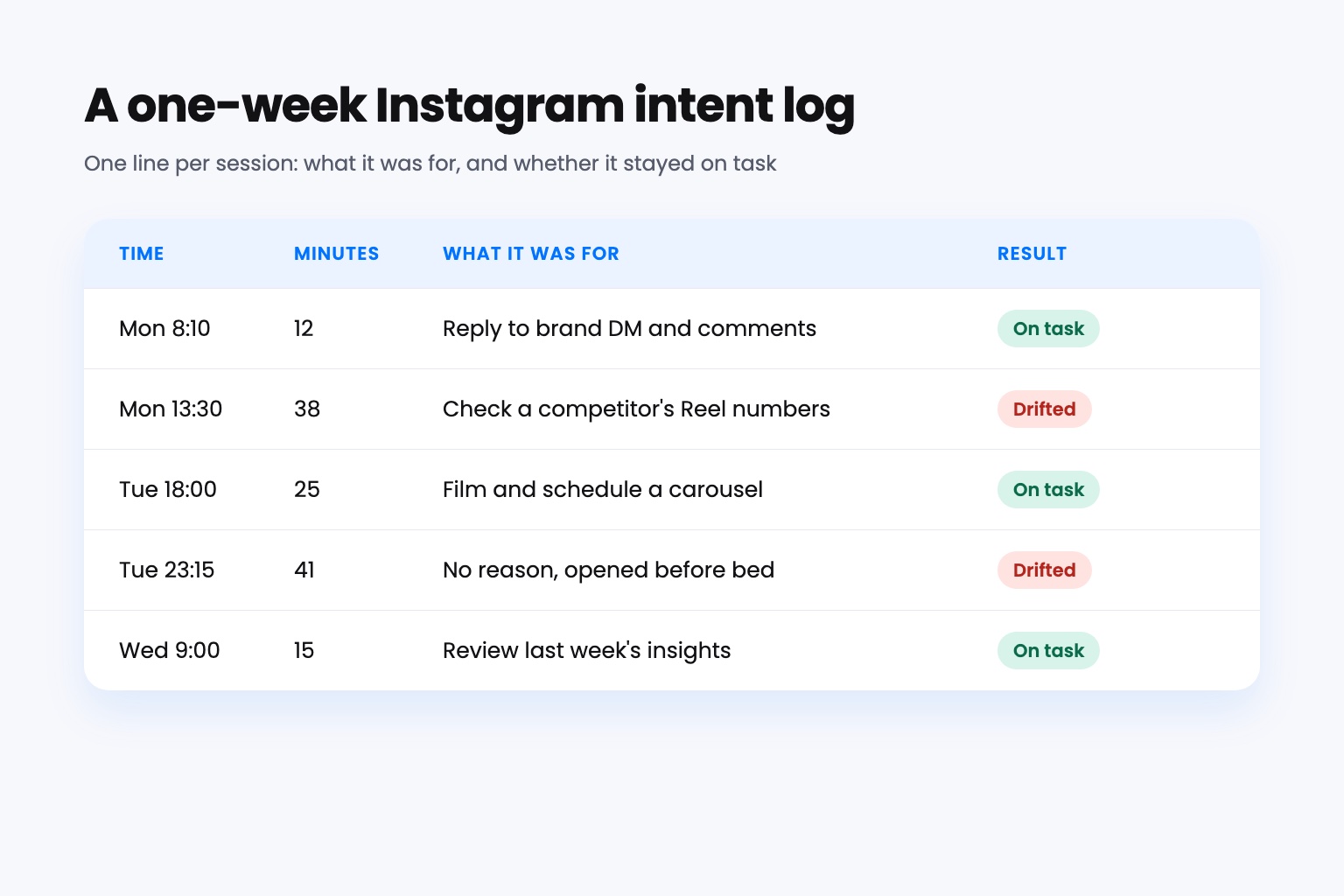
Screen time, as reported by iOS Screen Time or Android's Digital Wellbeing, counts every minute the app is open, regardless of intent. That number is useful but incomplete on its own. Two creators can both log four hours of daily Instagram screen time: one spent it filming, scheduling, and replying to leads, the other spent half of it doomscrolling. The raw figure doesn't distinguish between the two, so it's worth cross-checking screen time against a simple log for a week: jot down, in one line, what each Instagram session was for. Patterns show up fast once intent is attached to the number.
Using a screen time limit app without losing access you need
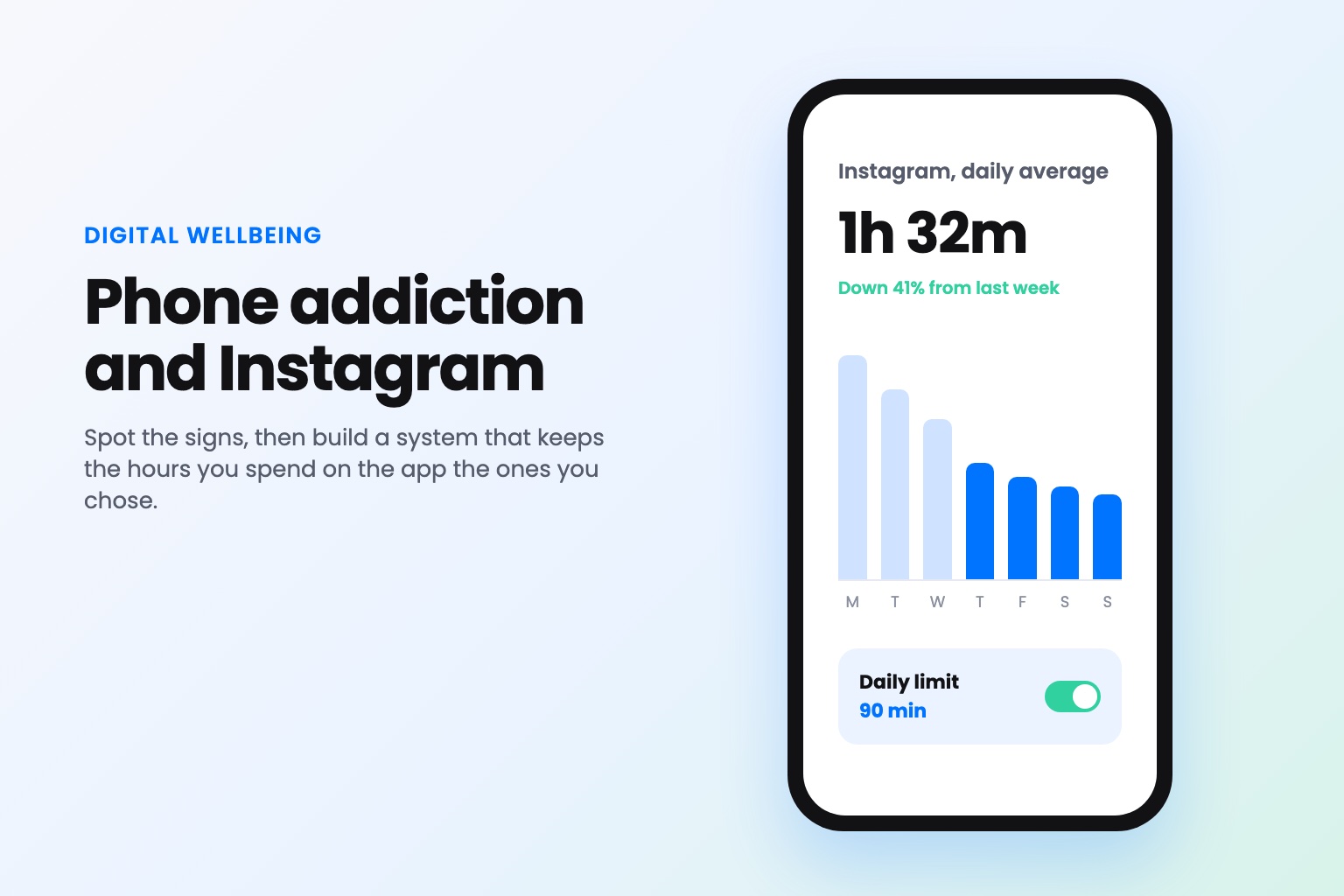
A screen time limit app (built-in options like Apple's Screen Time or Android's Digital Wellbeing, or third-party tools like One Sec and Opal) lets you cap Instagram usage without blocking it outright, which matters for anyone who can't afford to be locked out during a launch or a brand deal. The useful settings for creators specifically:
- Set a daily cap that's generous enough for actual work (say, 90 minutes) but well below your current baseline if your logged screen time is running at three or four hours.
- Use "soft block" or friction features (a timer delay before the app opens) rather than hard blocks, since hard blocks tend to get overridden anyway and just add irritation.
- Schedule a blocked window during the hours you least need Instagram for work, typically late evening, so the habit of checking it before bed gets interrupted automatically.
The goal isn't zero use. It's making the unconscious scroll slightly harder than the conscious, task-based one.
Building replacement habits that fit a creator's day
Cell phone addiction advice, including arguments from writers like Adam Alter in Irresistible, consistently points to the same fix: compulsive habits fade faster when they're replaced, not just removed. Simply blocking Instagram leaves the same gap in your day (the commute, the time between meetings, the wait before a filming session) and that gap gets refilled by something else, often another app.
Filling that gap doesn't require an elaborate system. A short walk, a two-minute stretch routine, or a single page of a book can absorb the same five minutes that would otherwise go to a reflexive check of the app. The key is having something ready before the gap opens, so the decision is already made by the time your hand reaches for the phone.
When the fix needs to go further
If a screen time limit app and replacement habits haven't moved the needle after a few weeks, and the signs covered above are still showing up daily, it's worth treating this as more than a productivity tweak. Talking to a therapist familiar with behavioral and technology-related compulsions is a reasonable next step, particularly if the anxiety around not checking the phone is interfering with sleep or in-person work. This isn't a failure specific to creators. It's a predictable outcome of using, for a living, a product engineered to maximize time on screen.
Start with one week of tracking
Cell phone addiction is hard to fix in the abstract because "use less" has no finish line. A better starting point is one week of logging actual screen time against actual intent, then setting a single cap inside a screen time limit app based on what that log shows. Adjust from there. The point isn't to use Instagram less out of guilt. It's to make sure the hours spent on it are hours you chose, not hours the algorithm filled in for you.