Analytics
Instagram Story Views: Who Sees Your Story and How to Get More
Story views count how many times your Story was watched. Where to find Story analytics, what the metrics mean, and how stickers and Highlights bring more views.
By Flock Social TeamPublished April 24, 2026Updated October 31, 20267 min read

Instagram Story views count how many times your Story was watched, and you find them by opening the Story and tapping the Insights button in the lower right corner. The metrics beside views (interactions, sticker taps, navigation and profile activity) show how people react, so this post suits influencers and businesses who want more from Stories. For older Stories see how to see past Instagram stories, for video see who viewed your Instagram videos, and for what Flock shows, Flock's growth analytics.
What are Instagram Story views?

Instagram story views are a pretty simple metric. All it shows you is the number of times your story has been viewed. The greater the number, the better.
This metric is crucial to evaluating how big your reach is. If you have lots of followers, but your views are down, that means you're not doing something right, and people are avoiding your account on purpose.
The best way to find out what's the problem is by simply asking your audience what's the problem with your content and what they think you should improve on. And you can do that with Instagram stories. There are tons o story features that allow you to engage with your audience.
How do you see your Instagram Story analytics?
Accessing your IG story analytics is pretty simple. First, you have to fire up the Instagram app on your phone and go to your stories.
Next, you'll see an insights button in the lower right corner. All you have to do to pull out the Instagram story analytics is just to tap the Insights Button.
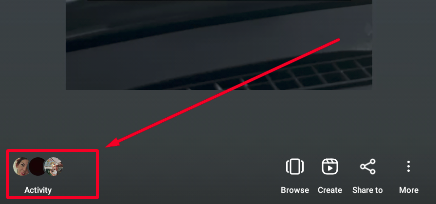
Not only are you able to see how many users saw your Instagram story, but you can also see exact accounts that saw it.
Pretty useful for spotting loyal fans or annoying stalkers!
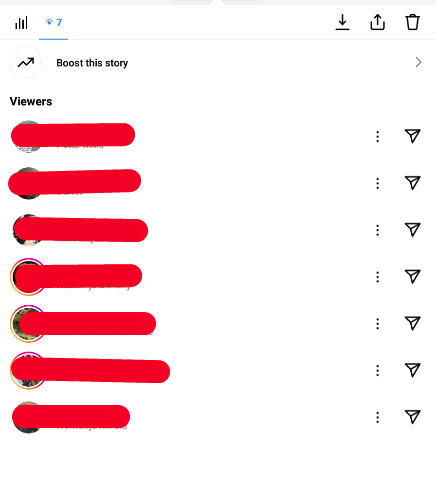
This feature is available for both personal and business accounts. If you're still on a personal account, you should switch to a business account since you'll get more opportunities to grow your audience, and you'll get access to nifty features such as more detailed analytics as well as the ability to boost posts.
Metrics included in IG Story views

Instagram story analytics give you insight into more than just who saw your story. You also get tons of other useful metrics.
Before we go any deeper into this topic, let's see how you can access those analytics.
Thankfully, that's as simple as pie. Once you've opened the Instagram activity button in the lower right corner of the story, just tap on the three vertical lines in the menu:
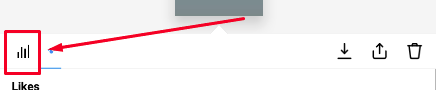
The story metrics are your bread and butter for improving your engagement and reach, so let's have a closer look at them.
The first metric you get is your basic overview. You can see how many accounts you've reached, how many have engaged, and how many profile visits you got.
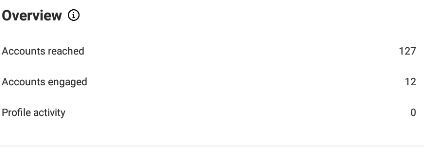
Next, you get a breakdown of each of the metrics from the overview section.
The first one is reached. Here you can see a breakdown of how many accounts you've reached. You can see how many accounts that follow you saw the story versus how many of those that don't follow you have seen.
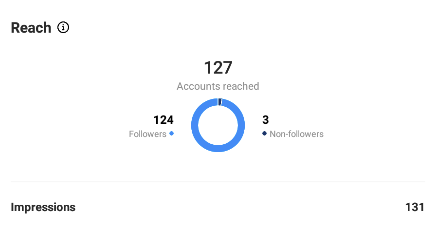
Next, you get a breakdown of engagement.
This is also pretty much the same as the reach, as it shows you how many accounts that follow you have engaged with your story versus how many of those that don't follow you did.
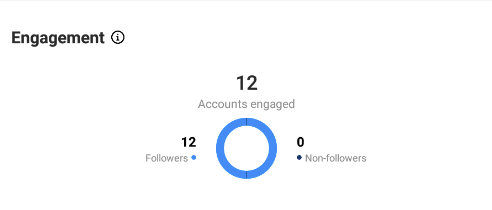
Engagement metric also comes with quite a few nifty subsections. Those being:
- Story interactions: how many users replied to or shared your Instagram story.
- Sticker taps: how many people tapped on the interactive sticker.
- Navigation: how people moved through your Stories. This includes forward taps, exits, scrolling to the next story, and going back to the previous story.
- Profile activity: how many profile visits and follows the story has generated.
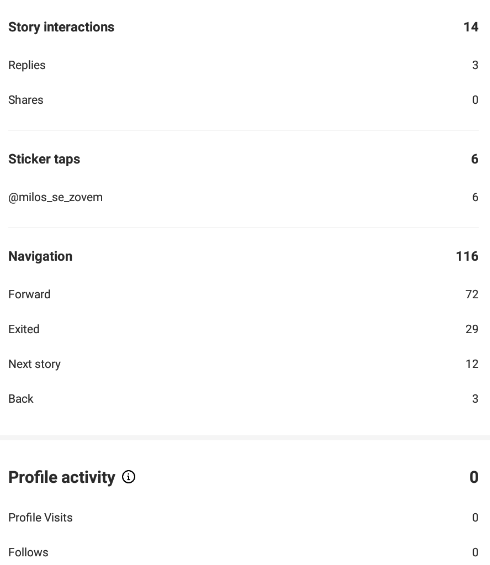
Now that you're familiar with all the story analytics, let's move on to how you can analyze them so you can improve your growth.
Analyzing Story viewership trends

The developers at Meta have made it pretty easy to view the metrics, but analyzing them is much more difficult. Let's start with views.
If your views are down, that means that you're either overdoing it with the story posting or you're not posting enough.
If you're the type of person who posts 10+ stories a day, you should dial that number down to around 3 or 4. There's no need for more.
On the other hand, if you post just a couple of stories each week. You should try and post at least 3 stories each day. You'll see the number of views climbing slowly but surely over the course of the month.
The other important metric is navigation.
This little metric is more useful than you think since it shows how people actually engage with your story content. If people are frequently exiting when they see your story, you should try refining your content and making it more appealing to your fanbase. Lastly, you should keep a close look at the activity metric.
The more replies and shares you get, the better for your reach.
This is also a good metric for letting you know whether you're doing things right or not.
Utilizing IG Story features for engagement

As we've already mentioned, Instagram stories are one of the best ways to increase engagement on your envatoelement’s account.
That's because you get tons of useful features such as polls, questions, quizzes, and more.
Of course, this will just get you to a certain point. If you want even more engagement, see how Flock grows an account. It focuses on real people who fit your account, so the followers it brings are more likely to engage with your content.
Using Story features to increase engagement
The best way to boost your IG engagement is with interactive stickers, namely the question and poll stickers.
For instance, if you're a fashion brand you can create a poll where your followers can vote which one of your clothing pieces they like the most. This won't just boost your engagement but also tell you which type of clothes you should advertise more.
As for questions, the sky is the limit with this feature!
You can use this feature to ask your audience directly how you can improve your content or just to keep them engaged.
Just be sure to reply to as many replies as you can because that'll show the people who follow you that you really care about their opinions.
Promoting your IG Stories
Promoting your stories just for the sake of boosting your engagement and views is no good.
This is because most people just skip it and are even less likely to engage with it. This is because story ads, in most cases, disrupt the user while they're scrolling through this feature.
With that said story ads are perfect for boosting views and engagement on your other platforms. Whether you're a YouTube or a streamer, slapping a link sticker on the story ad will surely net you some followers.
To have any success with promoting IG stories make sure you utilize the entire screen and ensure the story is on brand as possible.
Using Highlights to extend Story lifespan

Story Highlights are by far one of the best ways to keep the engagement on your account up. This is a pretty nifty feature that allows you to save and not have them expire after 24 hours.
We recommend you use story highlights to keep all stories that performed above average or have gone completely viral.
The best thing about this feature is that you can create multiple highlights. You can use this to your advantage by grouping stories. As to how you're going to group them, that's all on you.
But if you want to have a bit more success with your growth, we recommend you check out your competition and try finding inspiration in what they're doing.
Conclusion

Stories are integral to your Instagram growth. Ever since it was released more and more people are logging in just for this feature alone.
This is why it's crucial you use it to its full potential.
Whatever you do, just keep a close eye on the metrics. If your stories aren't netting you any followers or engagement, you should work on improving your content.